Generate an encounter
Set your party's level and size, pick an encounter type and difficulty, and roll an encounter that fits.
The Encounter Builder picks SRD 5.2 monsters that fit your party's XP budget. You don't need an account to generate one; you need one only to save it (see Save an encounter).
Steps
-
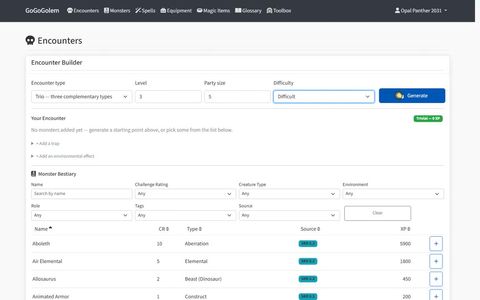
Open the app. The Encounter Builder is the first thing on the Encounters page.
-
Choose an Encounter type:
- Horde: many weak monsters.
- BBEG: one big bad.
- Squad: a boss with support.
- Duo or Trio: two or three monsters of types that complement each other.
-
Set Level (1 to 20) and Party size (1 to 10) for your group. They start at level 5 and four characters.
-
Choose a Difficulty: Easy, Moderate or Difficult.
-
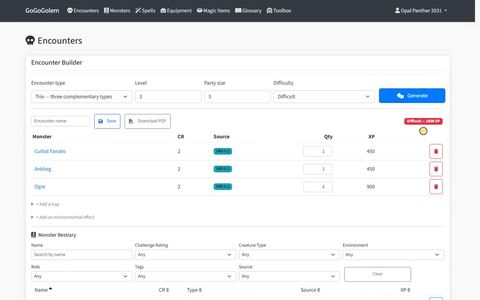
Select Generate. The monsters appear below the settings, with each one's challenge rating, quantity and XP.
-
Check the badge beside the list. It shows how hard the encounter is for your party and its total XP, for example "Moderate — 1100 XP".
Adjust the result
- Not quite right? Select Generate again. A new roll replaces the whole list.
- Change the numbers. Edit a monster's quantity, or remove it with the trash button. The badge updates as you go.
- Add a monster by hand. Use the monster list under the encounter: filter by name, challenge rating, creature type, environment, role, tags or source, then select Add.
- Changed your party? Edit Level or Party size and the difficulty is worked out again for the same monsters. Generate again if you want monsters picked for the new budget.
- Read a stat block. Select a monster's name to show its summary, or open its full page.
When you are happy with it, save the encounter so you can use it at the table.